GSA: Don't forget the logs
Because I had to travel a lot recently, I spent weeks using Global Secure Access (GSA) on my MacBook. GSA is Microsoft’s take on Zero Trust networking: instead of extending your internal network with a full-tunnel VPN, it gives devices and apps secure, policy-driven access to resources while keeping visibility and control.
As with any security solution, it’s crucial to monitor and log activities.
| Report Type | Microsoft Entra ID Free | Microsoft Entra ID P1 | Microsoft Entra ID P2 |
|---|---|---|---|
| Audit Logs | 7 days | 30 days | 30 days |
So don’t forget to forward your GSA logs to a centralized logging solution for better visibility and compliance.
Not a big deal - as usual, configure this in Microsoft Entra ID diagnostic settings to send logs to a Log Analytics workspace, Azure Event Hubs, or a Storage account.
Source: https://learn.microsoft.com/en-us/entra/global-secure-access/how-to-view-traffic-logs
Check retention and alerting in your logging solution so you can detect and respond to suspicious activity quickly.
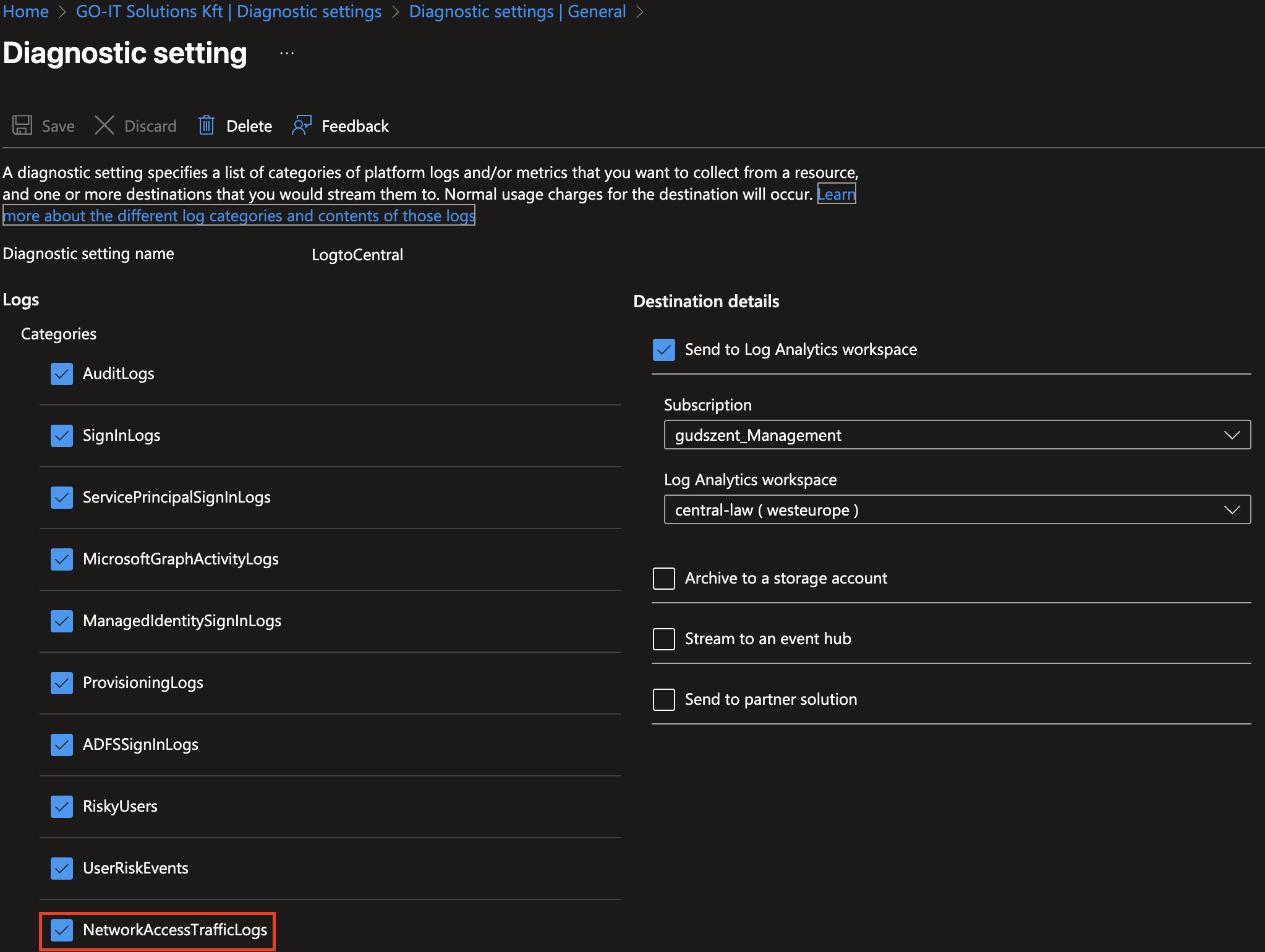
Than you have a capeability to monitor access patterns, identify potential threats, and ensure compliance with organizational policies. Let’s play a little bit with logs!
Here is one example query to find failed access attempts:
1
2
3
4
5
6
7
8
9
10
// GSA - suspicious sign-ins and conditional access failures (last 24 hours)
let excluded_users = dynamic(["svc_monitor", "health_check"]);
SigninLogs
| where TimeGenerated > ago(1d)
| where UserPrincipalName !in (excluded_users)
// include failed sign-ins, high aggregated risk, or conditional access failures
| where ResultType != 0 or RiskLevelAggregated == "high" or ConditionalAccessStatus == "failure"
| extend Location = tostring(Location), IP = tostring(IPAddress)
| summarize Attempts = count(), FirstSeen = min(TimeGenerated), LastSeen = max(TimeGenerated) by UserPrincipalName, IP, AppDisplayName, ConditionalAccessStatus
| order by Attempts desc
But I also like to see which applications are most accessed via GSA:
1
2
3
4
5
6
7
8
9
10
11
12
13
14
let window = 7d;
SigninLogs
| where TimeGenerated > ago(window)
| where isnotempty(AppDisplayName)
| extend IP = tostring(IPAddress), CA = tostring(ConditionalAccessStatus)
| summarize Accesses = count(),
            UniqueUsers = dcount(UserPrincipalName),
            Failures = countif(ResultType != 0),
            FirstSeen = min(TimeGenerated),
            LastSeen = max(TimeGenerated)
    by App = AppDisplayName, CA
| order by Accesses desc
| take 100
| render columnchart
and so on. Happy logging!