Native Tenant Restrictions for Multi-Tenant Apps
In Preview, Microsoft just presented a new feature to restrict SPN access to specific tenants. If you’ve ever managed a multi-tenant app, you know the struggle. Usually, “multi-tenant” is an all-or-nothing deal—either the whole world can try to sign in, or nobody can. To lock it down to just your partners, you usually had to write custom code to check the “Issuer” claim.
Well, those days are (thankfully) ending. Microsoft is rolling out a native “Allow List” directly in the Entra portal. It’s a no-code way to make sure your app stays exclusive to the organizations you actually trust.
Prerequisites
- Usually, most companies have these, but here is the list of what you’ll need to get the most out of this setup:
- Licensing: Assign users a license that includes Microsoft Entra ID P1 or P2.
- Device State: A Microsoft Entra joined machine (Entra joined or hybrid joined is good as well).
- Identity Security: Enable Microsoft Entra multifactor authentication with Conditional Access (Just Recommended, but honestly, you really should).
- The “VIP List”: You’ll need the Tenant IDs (the 36-character GUIDs) for every external organization you want to permit.
Setting Up
Luckily, that not too hard. Just head over to the Entra portal, find your app registration, and look for the new “Tenant Restrictions” section. Here, you can add the Tenant IDs of the organizations you want to allow. It’s as simple as that.
Very important, currently this is in preview, so not garanteed that will work and do not expect any support from Microsoft if you have any issue.
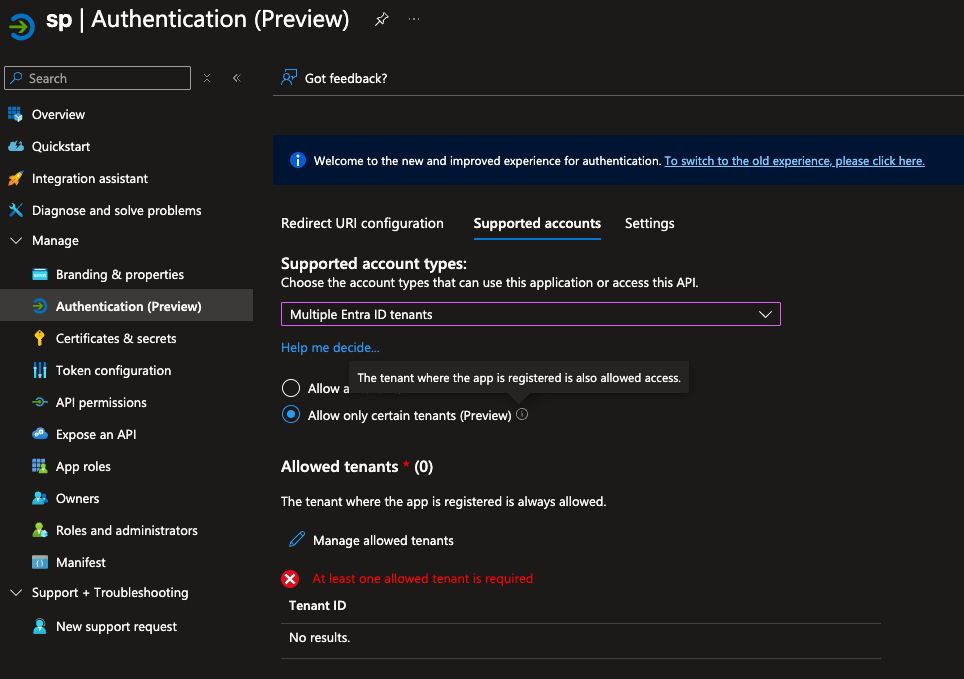
Once you save your changes, only users from those specified tenants will be able to sign in to your app. I hope this will make life easier for everyone managing multi-tenant applications. It’s a small change, but it can have a big impact on security and user experience. Cant wait to see in production!