Global Secure Access for Private Network
I beleive, one of the most important things the good userexperience. We should build the world best architected solutions, but if the user experience is bad, nobody will use it. When I build a solution, I always try to make it as simple as possible for the users and maximize the user experience. Just like with GSA, if I want to reach my private endpoints, I want to reach them on the shortest way, I dont want to a datacenter and back if I can reach them directly in the next room.
When you start to implement GSA, you will see that you may reach everything, just a firewall request question. If you check more closely, you will see when you create the GSA and create the first connector, your communication will go through that connector all the time. So does not matter where you are, if the connection in an Azure datacenter but you are at home and you want to reach a server next to you, you will go to the datacenter and back. So with huge latency and maybe with limited bandwidth but you can reach it. From operation perspective the service is reachable, so check, ticket closed, but from user experience perspective, it is not good at all. Thats why you need to understand your network and the GSA architecture to make sure you can reach your resources in the best way possible.
So how can we optimize the user experience? Enable Intelligent local access capability. This is a new feature in GSA, sadly currently in preview, but I think without this feature you should not implement GSA. The implementation easy, lets see
Prerequisites
- GSA licence, (30days trial available)
- Windows Server 2012 R2 or later for the connector
- Properly implemented private DNS zones and resolver (Always the DNS the key for private endpoints)
Configure Intelligent local access
go EntraID and open Global Secure Access -> Connect -> Private networks (Preview)
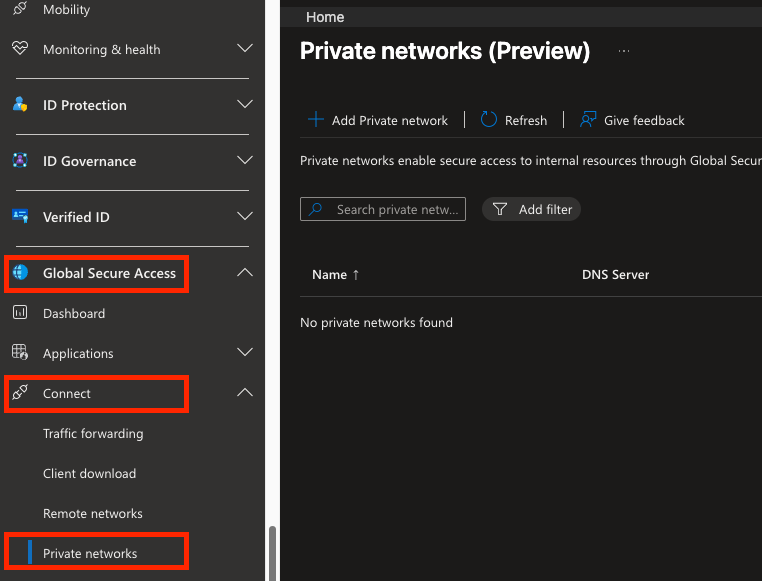
Then click on add Private network
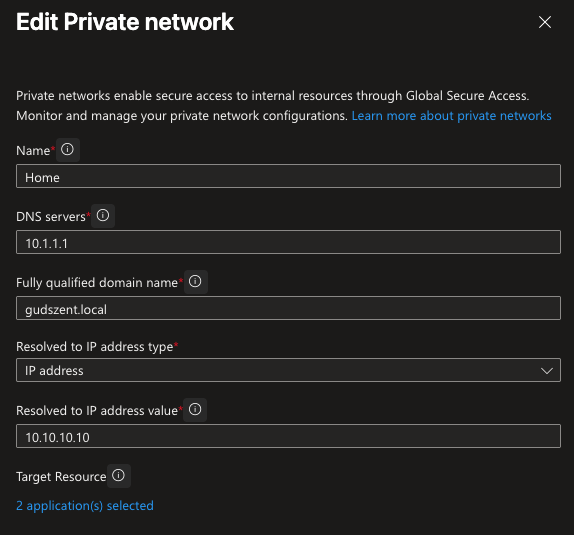
DNS servers: your DNS server what will be used to determinate it is internal or external network Fully qualified domain names: the FQDNs what try to resolve Resolved to IP address type: the IP address type what you want to use for the resolution Resolved to IP address values: what you expect to get back when resolve the FQDNs from your DNS server
and tada, you reach the local network without going to the datacenter and back.
On MacOS not working currently, I just loose 3 hours to figure out why I cannot reach my local network, but on Windows it works like a charm. So if you want to test it, use a Windows machine.